Best Free Habit Tracker Apps Without Ads (2026-2027): Tested and Ranked
I deleted my third habit tracker in six months sometime last year. Not because I stopped caring about building better routines. Because every single time I opened the app to check off a habit, I got hit with a full-screen ad before I could tap anything. After three seconds, a little skip button would appear. Thirty days of that and the app itself becomes the habit you want to break.
Finding a habit tracker that is genuinely free, has no ads, and does not hide your streak behind a paywall turned out to be harder than it should be.
I tested six of the most popular options available in 2026. Some were honest. Most were not. Here is what I found.
Quick Verdict
| App | Platform | Ads | Habit Limit | Best For |
|---|---|---|---|---|
| Loop Habit Tracker | Android only | None | Unlimited | Android users, privacy-focused |
| Habitica | iOS, Android, Web | None | Unlimited | Gamification, social accountability |
| HabitBox | iOS, Android | None | Unlimited (free) | Beginners, clean UI |
| TickTick | iOS, Android, Web | None | Free tier available | Task + habit combo users |
| Finch | iOS, Android | None | Unlimited | Wellness-focused, ADHD-friendly |
| Notion | iOS, Android, Web | None | Unlimited | Power users, custom setups |
The Real Problem With “Free” Habit Apps
Most free habit tracker lists are misleading. They include anything with a $0 install price, which is not the same as free to actually use.
The most common traps: habit count limits on the free tier (usually three to five), reminders locked behind a paywall, streak history hidden after a few weeks, and interstitial video ads every time you open the app.
That last one ended three apps for me personally. An app showing ads every time you check in is not a free habit tracker. It is an ad platform with habit tracking bolted on.
Every app below is either completely ad-free, open source with no upgrade tier, or has a functional free plan with limitations clearly disclosed upfront.
1. Loop Habit Tracker (Android)
Loop Habit Tracker is the most honestly free app in this category. No ads. No Pro tier. No account. The source code is on GitHub under GPLv3. Everything runs locally on your phone. Nothing is sent to a server.
What I found most useful about Loop is its habit score system. Instead of a simple streak counter that punishes you the moment you miss a day, Loop has a habit score that weights recent days more than old ones, so a missed day a month ago does not hurt your score the way it would in a strict streak counter. That approach reflects how habits actually work. One bad day does not undo three weeks of consistency.
The analytics are detailed. Streak charts, frequency graphs, completion rates by day of week. For a free open-source app, the data layer is genuinely impressive.
The honest limitation: Android only. No iOS version exists, and there is no cross-device sync since all data stays on your phone. If you switch between an Android phone and an iPad, Loop will not follow you.
Best for: Android users who want full analytics, zero ads, and privacy-first data handling.
2. Habitica (iOS, Android, Web)
Habitica takes a completely different approach. Habitica turns habit tracking into a role-playing game. Every habit you complete earns gold and experience for a customizable character. The core game is free, ad-free, and open source. The Pro subscription only adds cosmetic boosts and a faster economy.
I was skeptical before using it. The idea of leveling up a cartoon character every time I drank water sounded gimmicky. After two weeks, I realized the game layer was doing something real. Missing a habit did not just reset a number. It dealt damage to my character. That small consequence was oddly more motivating than watching a streak counter drop.
The social features add another layer. You can join parties with friends and take on quests together. Missing your habits damages the whole party. Accountability from an app is usually hollow. Accountability from friends who can see your check-ins is a different thing entirely.
Habitica works on all platforms while also being free, making it one of the only no-cost options that covers iOS, Android, and web simultaneously. Data syncs across devices without paying anything.
Best for: People who quit habit apps out of boredom. If streaks alone do not motivate you, the game layer often will.
3. HabitBox (iOS, Android)
HabitBox sits in a category that does not get named often enough: genuinely functional free plan with an optional Pro upgrade that does not pressure you into paying.
The free core features include streak tracking, a calendar heatmap, and reminders. Pro is optional. If you stop paying for Pro, you keep all your data and the core features keep working.
The calendar heatmap is the feature I kept coming back to. Seeing a full month of check-ins displayed as a color grid is more motivating than a number at the top of the screen. Green squares build up. You start wanting to maintain the pattern. It is a simple trick but it works.
One thing that became obvious after regular use: HabitBox is designed for people who want a clean, fast daily check-in more than deep analytics. Opening it, tapping your habits, and closing it takes under fifteen seconds. That low-friction design is part of why it sticks.
What it lacks is a desktop version. If you do most of your planning from a laptop, you will be phone-only for habit logging.
Best for: Beginners who want a clean interface and a fast daily routine without navigating a complex app.
4. TickTick (iOS, Android, Web, Desktop)
TickTick is primarily a task manager, but its built-in habit tracker is solid enough that I use it as my main setup right now. The reason is simple: I was already living in TickTick for my to-do list, and switching to a separate app for habit check-ins added friction I did not need.
Because TickTick handles calendar events, reminders, and Pomodoro timers, you can schedule your habits alongside actual work tasks. “Write for 30 minutes” shows up in the same daily view as “reply to client emails.” Everything in one place.
The free plan covers habit tracking without ads. There is a premium tier that unlocks additional calendar features, but core habit functionality works without it.
The limitation: habit tracking is not the primary focus. If you want deep analytics on your habits specifically, Loop or Habitica will give you more data. TickTick gives you habit logging as part of a broader productivity system.
Best for: People who already use a task manager daily and want habits integrated rather than living in a separate app.
5. Finch (iOS, Android)
Finch does something different from every other app on this list. Completing daily goals grows your virtual pet bird. This emotional investment mechanism uniquely removes the anxiety around broken streaks, making it the most gentle and sustainable option for ADHD and mental health users.
I discovered Finch through a recommendation from someone who had tried six other habit apps and quit all of them. The streak anxiety problem is real. Some people find a broken streak motivating. Others find it discouraging enough to delete the app entirely. Finch sidesteps that by shifting the emotional frame away from “you failed” and toward “your bird needs you today.”
The wellness features go beyond habit logging. Daily check-ins include mood tracking, gratitude prompts, and breathing exercises. If your goal is building mental health habits alongside practical ones, the depth here is meaningful.
The free version is fully functional. Pro is around $9.99 per month, which is the most expensive upgrade in this category, but nothing in the core app is locked away from free users.
Best for: Anyone with ADHD, anxiety, or a pattern of quitting habit apps after breaking a streak.
6. Notion (iOS, Android, Web, Desktop)
Notion is not a habit tracker. It is a workspace tool. But with the right community template, it becomes the most flexible free setup in this category. Setup takes roughly twenty minutes, and what you get in return is complete control: track anything, connect habits to goals, attach notes to specific days, and build weekly reviews into the same workspace.
The downside is daily friction. Tapping a checkbox in Loop takes one second. Opening Notion and navigating to your habit database takes closer to fifteen. Over time, that adds up.
Best for: Power users who want total customization and are willing to trade speed for flexibility.
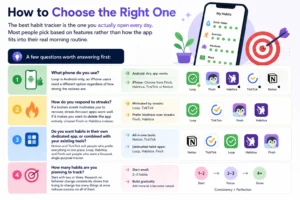
How to Choose the Right One
The best habit tracker is the one you actually open every day. Most people pick based on features rather than how the app fits into their real morning routine.
A few questions worth answering first:
What phone do you use? Loop is Android-only, so iPhone users need a different option regardless of how strong the reviews are.
How do you respond to streaks? If a broken streak motivates you to recover, streak-focused apps work well. If it makes you want to delete the app entirely, choose Finch or Habitica instead.
Do you want habits in their own dedicated app, or combined with your existing tools? Notion and TickTick suit people who prefer everything in one place. Loop, Habitica, and Finch suit people who want a focused, single-purpose tracker.
How many habits are you planning to track? Start with two or three. Research on behavior change consistently shows that trying to change too many things at once reduces success on all of them.

FAQs
Are any habit tracker apps truly 100% free with no ads?
Yes, a few. Loop Habit Tracker and Habitica are the clearest examples: no ads, no paywalls on core features, and open-source code. Most other “free” apps have at least some combination of ad banners or habit count limits. Always check the in-app upgrade screen before committing to any of them.
What is the best free habit tracker for iPhone users?
Loop is Android-only, so iPhone users need a different option. Habitica covers iOS fully for free. HabitBox and Finch both have solid iOS apps with no ads on the free tier. TickTick is another strong iOS option if you also want task management in the same app.
Can I track unlimited habits for free?
Several apps allow unlimited habits without paying. Loop, Habitica, HabitBox, Finch, and Notion all offer unlimited tracking on their free tiers. Habitify limits the free plan to three habits, which is genuinely restrictive for anyone tracking a full daily routine.
What habit tracker is best for someone with ADHD?
Finch is the most frequently recommended for ADHD users because it removes the anxiety around broken streaks and uses a nurturing emotional frame rather than a punishment-based one. Habitica is also a strong option because the game layer provides external motivation that streak counters alone cannot replicate.
Do these apps work offline?
Loop stores everything locally and works entirely offline. HabitBox and Finch work offline for logging and sync when you reconnect. TickTick and Notion require an internet connection for sync but cache recent data locally so basic functionality continues offline.
Final Thoughts
Most habit tracker apps are not actually free. They are free to install, which is a different thing. The apps on this list are honest exceptions: no full-screen ads, no habit limits designed to push you toward upgrading, and no streaks hidden behind a paywall.
Loop is the most honest free app if you are on Android. Habitica is the most full-featured free option across all platforms. Finch is the right choice if other apps have not worked because the streak anxiety became a reason to quit.
Pick one that fits how you already use your phone, start with two habits, and open it every morning before you open anything else. The tool matters a lot less than the consistency you build around it.