Best AI Tools for Creating Digital Products: A Creator’s Honest Guide
Selling digital products has become one of the more realistic income streams for independent creators. Ebooks, templates, mini-courses, Notion dashboards, Canva packs, printables. The market exists and the demand is real.
The bottleneck, almost always, is production time. Research, writing, design, formatting, and sales copy all need to come together before you can list anything. AI tools have changed that math considerably, but not every tool earns a place in a creator’s workflow.
I spent several weeks building and launching actual digital products using different AI tools. Here is what I found.
Why the Right Tools Change the Production Math
AI tools do not replace a creator’s expertise. What they replace is the blank-page friction, the formatting grind, and the copy tasks that consume hours without requiring creative skill. Once I separated those two categories in my own work, the tools became much easier to use well.
1. ChatGPT: The Core Engine for Content-Heavy Products
For digital products built around written content, ChatGPT is the most practical starting point. Ebooks, email templates, swipe files, workbooks, and prompt packs all require structured writing at volume. ChatGPT handles that drafting load well when given a clear brief.
Treat it like a collaborator rather than a vending machine. Give it your chapter structure, your target reader, and your core argument, then ask it to draft one section at a time. The output is rarely publish-ready, but it gives you something to edit rather than something to invent from scratch.
Real example: I was building a freelance proposal template pack. Twenty templates covering different service types. Writing twenty distinct templates manually would have taken the better part of two days. I gave ChatGPT a master template structure, the variables for each service type, and asked it to generate each version. With editing, the full pack was ready in about six hours.
One honest limitation: ChatGPT does not format output into actual files. It generates text. Moving that text into a designed PDF or structured document requires another tool.
2. Canva AI: Turning Written Content Into Sellable Products
Most digital products are not just content. They are designed content. A readable ebook, a usable workbook, a professional-looking template pack. Design is where many creators lose hours, especially without a visual background.
Canva’s AI features, including Magic Write, the background remover, and layout suggestions, make polished product design possible without formal design skills. The workflow I landed on: generate content with ChatGPT, drop it into a Canva template, then use Canva’s formatting tools to clean up the layout.
After testing across several product types, I discovered Canva works best for products with repeating structure. Workbooks with consistent page layouts. Template packs with standardized formatting. Slide decks where each slide follows the same visual logic.
Real example: A 30-page productivity workbook I built using this workflow sold on Gumroad. The content came from AI-assisted drafting. The design used a Canva workbook template with consistent section headers and reflection pages. Total production time was two days.
3. Claude AI: For Products That Need Depth and Nuance
Not every digital product is a quick-read guide. Some require a coherent argument across many pages. A research-backed framework. A comprehensive course companion. For these, Claude tends to produce more structured output than ChatGPT on the first pass.
I realized this after building two similar products side by side. A short swipe file worked fine with ChatGPT because the task was structured and repetitive. A long-form strategy guide needed something that could hold a logical argument across 6,000 words without drifting. Claude handled that more cleanly, with fewer gaps to fill during editing.
Real example: I built a digital product around a content planning framework. Both ChatGPT and Claude were given the same structure. Claude’s version required about 30 percent fewer structural edits to reach a publishable state. For a product where the argument is the selling point, that difference mattered.
4. Notion AI: Organizing and Structuring Product Systems
Digital products are systems, not just files. A course needs a curriculum map. A template bundle needs a usage guide. Notion AI helps creators plan and document those structures before production begins.
One thing that became obvious after using it consistently: Notion AI delivers the most value during the planning phase, not the writing phase. Use it to map your product structure, define what each section needs to contain, and create a reference doc that keeps production organized.
Real example: Before building a six-module course on freelance client management, I used Notion AI to turn rough topic notes into a full curriculum outline. Module names, lesson titles, and a one-sentence objective for each lesson. The planning session took 40 minutes instead of the half-day I would have spent building the same structure manually.
5. Grammarly: The Final Pass Before Every Launch
Digital products get read carefully. Buyers notice errors in a way that casual blog readers scroll past. A typo in an ebook introduction or a grammar mistake inside a template undermines the perceived value of everything around it.
Grammarly runs across almost every writing surface and catches issues in real time. For digital product creators, the most useful application is the final check before export. Run every page through Grammarly before converting to PDF.
Real example: Before launching a client onboarding email template pack, I ran all 12 templates through Grammarly. It flagged seven issues across the pack, mostly clarity problems and one repeated phrase I had not noticed. Fixing those before launch took 15 minutes and protected the product’s credibility with buyers.
Quick Comparison: AI Tools by Digital Product Type
| Product Type | Primary Tool | Supporting Tool |
|---|---|---|
| Ebooks and long guides | Claude AI | ChatGPT for section drafts |
| Template packs and swipe files | ChatGPT | Grammarly for final check |
| Workbooks and printables | Canva AI | ChatGPT for content |
| Course curricula and outlines | Notion AI | Claude for detailed modules |
| Sales page copy | ChatGPT | Grammarly |
| Prompt packs and resource lists | ChatGPT | Canva for design layout |
Honest Limitations Worth Knowing
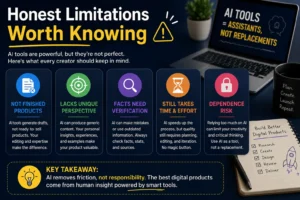
No AI tool generates a finished, sellable product on its own. The creator’s expertise and editing still determine final quality. What these tools replace is low-skill time, not high-skill judgment.
AI-generated content also drifts toward generic without strong prompting. Digital products sell because they offer a specific perspective or a specific usefulness. That specificity comes from the creator. AI provides structure and volume. You provide the insight worth buying.
Building reusable prompt templates for your most common product types solves most consistency issues over time.
Pros and Cons at a Glance
ChatGPT
- Fast for structured, high-volume content tasks
- Ideal for template packs and swipe files
- Requires strong prompting for usable quality
- Does not produce formatted files
Claude AI
- Stronger on long-form, argument-driven products
- Holds structure better across length
- Free tier has daily usage limits
Canva AI
- Accessible design for non-designers
- Best for products with repeating layout formats
- Advanced AI features on Pro plan only
Notion AI
- Excellent for product planning and curriculum structure
- Less useful for actual content production
Grammarly
- Catches errors that self-editing misses
- Works across nearly every writing surface
- Advanced features need paid plan

FAQ
Can I create digital products to sell using only AI tools? AI tools handle the structural and drafting work well, but the insight, positioning, and editing still need to come from you. Products built on unedited AI output tend to lack the specificity buyers pay for. Use AI to accelerate production, not to replace the expertise that makes your product worth purchasing.
Which AI tool is best for creating an ebook? A combination works better than a single tool. Draft with ChatGPT or Claude, design and format the final PDF in Canva, and run a Grammarly check before export. Claude handles longer, more nuanced ebooks with fewer structural edits needed. ChatGPT works well for structured or template-style content.
Do AI-assisted digital products sell well? The quality of the product determines sales, not the production method. Carefully edited AI-assisted products positioned clearly for a specific audience can perform well. Rushed or generic products do not, regardless of what created them.
How long does it take to build a digital product with AI tools? A simple template pack or short guide can realistically go from idea to finished file in one to three days. A course or comprehensive guide typically takes one to two weeks including editing and design. AI compresses the timeline meaningfully, but quality still requires time.
Is Canva enough for designing professional digital products? For workbooks, ebooks, template packs, and printables, Canva’s tools are sufficient for a professional result. Products requiring highly custom layouts or print-precision design may need something more advanced. For most creators starting out, Canva covers the design requirement adequately.
Final Thoughts
The tools that help the most are not the ones with the most features. They are the ones that remove the specific friction points in your workflow.
Identify where your production time actually goes. If writing is the bottleneck, Claude or ChatGPT addresses that directly. If design is where projects stall, Canva becomes the priority. If planning feels disorganized, Notion AI is where to start.
Most productive digital product creators use a small combination at different stages. Content drafting with AI, design in Canva, final polish with Grammarly. That stack covers the full production pipeline for most product types without overcomplicating the process.
Build around your actual bottlenecks. Not around what looks impressive in a tutorial.