
How to Use ChatGPT in Daily Tasks: Practical Ways to Save Time and Work Smarter
Table of Contents
- Start the Morning With a Clear Plan
- Writing Emails Without the Mental Drain
- Learning New Things Faster
- Getting Writing Work Done
- Making Research Less Overwhelming
- Working Through Creative Blocks
- Comparing Options Before Making Decisions
- Building Checklists That Actually Get Used
- Using ChatGPT for Personal Life Tasks
- What to Watch Out For
- Frequently Asked Questions
Introduction
Here’s the honest version: most people burn two to three hours daily on tasks that don’t actually need their full attention. Drafting emails, hunting for information, staring at a blank document trying to figure out where to begin. ChatGPT doesn’t make those tasks disappear, but it cuts through them faster than anything else right now.
Treating it like a search engine is the wrong starting point. Think of it more like a thinking partner available at any hour one that can switch between organizing your week, editing a report, and generating meal ideas without missing a beat.
This guide skips the general advice. Every section has a real prompt you can copy and adjust right now.

Start the Morning With a Clear Plan
The morning’s first hour tends to shape everything that follows. Most people spend it reacting — checking notifications, scrolling emails — and then wonder why noon arrives before any real work gets done.
Giving ChatGPT a raw task list and asking it to sort by urgency and effort takes two minutes. It won’t always nail the order, but having any structure is better than the scattered feeling that builds up by mid-morning.
One week with seven competing deadlines, this single habit made the difference. Writing tasks went first, before email, before admin. By early afternoon the heavy work was finished.
Try This Prompt: “Here are my tasks for today: [paste your list]. Organize them by priority, putting deep-focus work first and quick tasks last. Assume I have about 6 hours of working time.”
This works well for:
- Daily priority lists when everything feels equally urgent
- Weekly study timetables for students managing multiple subjects
- Project roadmaps broken into realistic daily steps
- Timelines when the task list looks impossible at first glance
Writing Emails Without the Mental Drain
Email writing looks like a ten-minute job until you track it across a full week. The number is usually much higher.
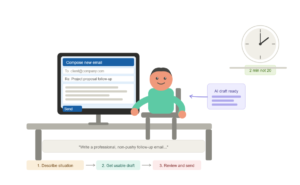
Most professional emails follow the same recognizable patterns — follow-ups, requests, introductions, replies to complaints, project updates. Once you see that, it becomes clear a first draft can come from a short description rather than being built from nothing every single time.
Describing the situation, the recipient, and the desired tone gets a usable draft back fast. Reviewing and personalizing takes two minutes instead of twenty.
The uncomfortable messages are where this helps most. A follow-up after a client goes quiet for three weeks is genuinely awkward to write from scratch. Describing the situation and asking for something professional and non-pushy produces a cleaner result than most people manage under that kind of pressure.
Try This Prompt: “Write a professional, non-pushy follow-up email to a client who hasn’t responded to my project proposal in 3 weeks. Keep it brief, friendly, and end with a simple yes/no question.”
One non-negotiable: always review before sending. Names, dates, and specific details need eyes on them every time.
Learning New Things Faster
Most learning stalls not because the topic is too hard, but because the explanation pitched at the wrong level. Too basic and it feels patronizing. Too advanced and it loses you in the third paragraph.
Adjusting explanation depth in real time is one of the most underused features here. Ask for plain language first, follow up with specific questions as clarity builds. Layer by layer instead of front-loading everything at once.
When trying to understand cloud computing for a client project, two attempts at reading official documentation hadn’t stuck. A three-step conversation — plain explanation, then technical version, then real-world analogy — worked on the first try.
Try This Prompt: “Explain [topic] like I’m completely new to it. Use a simple real-world analogy. Then give me 5 short questions I can use to test if I understood it correctly.”
This approach works well for:
- Chapter summaries: Scanning dense material before reading the full text
- Language practice: Conversing in a second language with real-time corrections
- Software training: Understanding a complex tool before a formal demo or training session
- Exam prep: Reviewing a subject the night before a presentation or test
Getting Writing Work Done
Writing tasks pile up fast. Articles, reports, presentation notes, meeting recaps, social media drafts. Every single one starts with the same friction: figuring out where to begin.
The hardest part of most writing isn’t the content. It’s the structure. Most people know roughly what they want to say. The problem is sequencing it into something readable.
Describing a topic and goal and asking for an outline returns a logical skeleton to build from. The actual writing still belongs to you — which keeps the voice authentic and the output from reading like it came from a machine.
After a long meeting covering too many points to track clearly, pasting rough notes and asking for a clean summary with action items separated produced something more organized than anything drafted while still mentally worn from the call. That summary became the project handoff document sent to the client that same afternoon.
Try This Prompt: “I attended a meeting about [topic]. Here are my rough notes: [paste notes]. Write a clean summary under 200 words with a separate ‘Action Items’ section at the bottom.”

Making Research Less Overwhelming
The early stage of research is often the hardest part. The topic is clear but the questions worth asking aren’t. Neither are the areas that actually have depth versus the ones that look substantial until you read them.
The biggest improvement shows up before any real reading starts. Asking for the main areas of debate within a topic, or a map of what a thorough investigation would need to cover, provides direction before a single source gets opened.
Before writing a piece on productivity tools, asking for ten research angles that most similar articles ignore surfaced three directions that made the final piece meaningfully different from standard coverage. One of those angles ended up being the most-discussed section in reader responses.
Try This Prompt: “I’m researching [topic] for an article. Give me 8 specific research questions I should explore, focusing on angles that most articles on this topic tend to miss.”
One important habit to carry into this: treat everything factual as a starting point. Statistics, regulations, and technical specs all need a verified second source before appearing in anything published or submitted.
Working Through Creative Blocks
Creative blocks aren’t usually about having no ideas. They’re about being stuck on one way of seeing something and genuinely not being able to look around it.
Last year, while planning a series of AI tool reviews, every topic felt too similar to what already existed online. Asking for gaps in existing coverage and angles that most reviews tend to skip produced something unexpected: a suggestion to compare tools based on real-world workflows instead of feature lists.
That angle became the highest-engagement piece from the entire series, driving more discussion than the standard comparison format had in months. The idea came from a five-minute conversation when every obvious approach had already been ruled out.
Try This Prompt: “I’m writing about [topic]. Most articles on this cover [common angles]. Suggest 6 fresh angles or underexplored perspectives that would make my piece stand out from what’s already ranking.”
Not every suggestion will land. Some will be obvious. But occasionally one of them shifts the frame just enough to unlock something that had been stuck for days.
Comparing Options Before Making Decisions
Decisions drag on when options feel roughly equal and the differences are hard to put into words clearly.
When comparing two hosting providers for a content site, asking ChatGPT to lay out differences in renewal costs, ease of use, and performance based on what had been described helped spot two things that independent research had completely missed. The decision took five minutes after that conversation instead of another full day of reading forum threads.
The key is context upfront. Specific priorities, budget, timeline, and constraints make the output relevant to an actual situation rather than a generic pros-and-cons list that could apply to anyone.
Try This Prompt: “Compare [Option A] and [Option B] for someone who needs [your specific requirement]. My priorities are [list priorities]. Format it as a side-by-side table with a recommendation at the end.”
Works well for:
- Software subscriptions and tool choices
- Online courses across different platforms and price points
- Budget approaches when multiple allocation options are on the table
- Equipment or service purchases where specs matter but so does real-world usability
Building Checklists That Actually Get Used
Most checklists fail for the same reason: too long, too vague, or built once and forgotten.
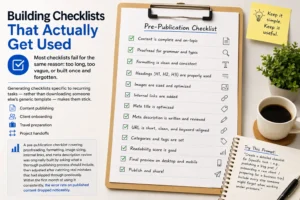
Generating checklists specific to recurring tasks — rather than downloading someone else’s generic template — makes them stick. Content publishing, client onboarding, travel preparation, project handoffs. Each list built around the actual steps in a specific workflow holds up far better.
A pre-publication checklist covering proofreading, formatting, image sizing, internal links, and meta description review was originally built by asking what a thorough publishing process should include, then adjusted after catching real mistakes that had slipped through previously. Within the first month of using it consistently, the error rate on published content dropped noticeably.
Try This Prompt: “Create a detailed checklist for [specific task — e.g., publishing a blog post / onboarding a new client / preparing for a business trip]. Include every step someone might forget when working under pressure.”
Using ChatGPT for Personal Life Tasks
Work tasks get most of the attention in guides like this one. Some of the most consistent time savings, though, show up in everyday personal tasks that don’t seem worth streamlining until you count how long they actually take each week.
Meal planning is a solid starting point. Describing what ingredients are already in the kitchen and asking for five dinner ideas that use them removes the daily “what should I cook” decision almost entirely. During a particularly packed travel month, this habit cut grocery spending by stopping the cycle of buying extras that never got used before going bad.
Travel planning carries a real research load that most people underestimate. Instead of opening fourteen browser tabs for a weekend trip, describing the destination, budget, and number of days and asking for a suggested itinerary gives a workable draft in a few minutes.
Try This Prompt: “Plan a 3-day itinerary for [destination] for 2 people on a budget of [amount]. Include morning, afternoon, and evening activities. Keep travel time between locations under 30 minutes where possible.”
Other personal uses worth building into a routine:
- Grocery lists organized by store section to cut shopping time in half
- Monthly budget breakdowns when income or spending has shifted
- Family schedules juggling multiple people’s commitments at once
- Gift ideas for specific people based on their interests and a real budget
- Packing lists built around actual weather and the type of trip rather than a recycled template
The personal applications tend to surprise people the most. The same logic that organizes a project deadline organizes a weekend plan just as well.
What to Watch Out For
ChatGPT isn’t a reference tool. It doesn’t always know when information has changed, and it sometimes presents outdated details with the same confidence as accurate ones.
Every factual claim that matters needs a second source. Statistics, legal information, medical details, pricing, and software features all require verification before they appear in anything published or acted on professionally.
A few habits worth treating as non-negotiable:
- Cross-check specific claims against official or primary sources before using them
- Never paste sensitive data into the chat — passwords, confidential business information, or unpublished research don’t belong there
- Read generated content carefully before using it; don’t copy-paste blindly
- Treat recent events as potentially outdated — the training data has a cutoff that doesn’t always match the current state of fast-moving topics
Software feature explanations are worth comparing against official documentation. Version changes happen frequently and the gap between what the tool knows and what’s actually shipped can matter.
Frequently Asked Questions, FAQS.
Q1. Is ChatGPT free to use for daily tasks?
The free version covers most everyday uses — writing help, planning, research exploration, and brainstorming included. A paid plan exists for faster responses and more advanced features, but the free tier handles the majority of routine tasks without issue.
Q2. Can ChatGPT replace professional advice?
No. It’s not a substitute for legal, medical, financial, or professional guidance. It can help clarify general concepts or prepare better questions before a consultation, but it doesn’t replicate the judgment or accountability of a qualified expert.
Q3. How do I get better results from it?
Be specific. Vague input returns vague output. Providing context — the goal, the audience, the constraints, and the desired format — consistently produces more relevant results. Treating it as a back-and-forth conversation rather than a single question works better than one-shot prompts every time.
Q4. Is it safe to use for professional work?
For general tasks like drafting, planning, and organizing, yes. Avoid sharing confidential client information, proprietary data, or anything with legal or privacy sensitivity. Checking your organization’s policy on AI tool usage before applying it to client-facing work is worth doing before the first use, not after.
Q5. Does it work for languages other than English?
It handles many languages with reasonable quality, though depth varies. For translation help, writing assistance, or concept explanation in a second language, the output is generally strong enough to be practically useful for most routine tasks.
Final Thoughts
The most practical way to think about this: friction reduction, not replacement. Planning, drafting, organizing, brainstorming, and comparing all move faster with it in the loop.
What changes most isn’t the speed. It’s that the parts of work that don’t require human judgment get handled, so the parts that do get more of your actual attention.
Start with one section from this guide. Pick the use case that matches whatever’s on your plate right now. The prompts are there — adjust them to fit your situation and see what comes back.