Best Free AI Tools for Small Businesses in 2026
Running a small business on a tight budget used to mean doing without. No copywriter, no analyst, no designer, no dedicated customer support person. Just you, a spreadsheet, and whatever willpower you had left by Thursday afternoon.
That dynamic has shifted. Not because money is suddenly easier to come by, but because a growing number of genuinely capable AI tools have free plans that are actually usable, not just demo versions designed to frustrate you into upgrading.
While testing tools across different small business scenarios over the past year, I kept a running list of what held up without costing anything. Some of these I use myself. Others came from direct conversations with small business owners in e-commerce, freelancing, and content-based businesses. This article is that list, organized by what each tool actually does and who it fits best.
How These Tools Were Evaluated Testing covered free plan limitations, daily usage caps, watermarks, feature restrictions, and real-world usability across content creation, customer communication, design, research, and business operations. Only tools with meaningful free access, not just free trials, made it into this guide. Pricing details reflect what is publicly available at time of writing and may change.
Why Free AI Tools Actually Matter Now
A few years ago, “free AI tool” usually meant a toy. Something that generated mediocre text with a 500-word limit or produced images that looked like fever dreams.
The standard has moved considerably. Several tools that now offer free plans are the same platforms used by mid-size marketing agencies and professional content operations. The free tier exists for user acquisition, not charity, which means the core experience is often genuinely good.
For a small business owner managing everything alone or with a two-person team, the math is straightforward. If a free tool saves four hours a week, that time goes back into revenue-generating work. At any reasonable hourly value, that is meaningful.
One thing that became obvious after testing dozens of tools: the best free AI tools are not always the most talked-about ones. Some of the flashiest names have the most restricted free plans. Some quieter ones give you far more to work with before asking for a credit card.
1. Content Writing and Copywriting
Claude by Anthropic
Claude has a free plan that allows a solid volume of daily conversations without requiring a subscription. For small businesses producing blog content, website copy, product descriptions, or email drafts, the free tier handles a meaningful workload.
What makes Claude different from other writing tools is how it reasons through complex requests. If you give it context about your audience, your tone, and your goal, the output reflects that. It does not just fill space.
Free plan limit: Daily message cap, resets each day. No API access on free tier.
Best for: Consultants, bloggers, service businesses, anyone producing regular written content.
After comparing several tools, I found Claude’s free plan more genuinely useful than most competitors at the same price point of zero.
Copy.ai
Copy.ai offers a free plan with a monthly word credit. For short-form content, it is one of the more capable free options available. Ad copy, social captions, email subject lines, product descriptions, landing page sections.
The workflow is template-driven, which makes it fast to use even without writing experience. You pick a format, fill in your product or offer details, and get multiple variations to choose from.
Free plan limit: Around 2,000 words per month on the free tier.
Best for: E-commerce sellers, small marketing teams, solopreneurs running paid ads.
ChatGPT (Free Tier)
ChatGPT by OpenAI remains widely used and the free plan covers a large range of writing tasks. Blog posts, email drafts, social content, FAQs, even basic SEO meta descriptions.
The free version uses GPT-3.5, which is less capable than the paid GPT-4 tier, but for most small business writing tasks it is adequate. Response quality improves significantly when you write specific, detailed prompts rather than vague requests.
Free plan limit: Access to GPT-3.5, usage is generally unrestricted but slower during peak times.
Best for: Businesses just starting with AI content tools, general-purpose writing across formats.
Writing Tools Free Plan Comparison
| Tool | Free Word Limit | Best Format | Needs Account |
|---|---|---|---|
| Claude | Daily message cap | Long-form, research | Yes |
| Copy.ai | ~2,000 words/month | Short-form, ads, captions | Yes |
| ChatGPT | Unrestricted (GPT-3.5) | General writing, drafts | Yes |
A small e-commerce business owner I spoke with was writing all her product descriptions manually, around 40 new listings per month. She switched to using Copy.ai’s free plan for first drafts and cut the time spent from roughly six hours to under 90 minutes. She described the remaining time as going toward photography and customer communication instead.
If writing is something you want to pursue professionally alongside your business, the path into content writing as a paid skill has also been reshaped by these tools.
2. Image Generation and Visual Design
Canva Free Plan
Canva is the most practical free design tool available for small businesses. The free plan includes thousands of templates, basic AI design features, a brand kit (with limitations), and direct publishing to social platforms.
For businesses that need consistent visual output across social media, email headers, presentations, and basic marketing materials, Canva’s free tier covers the majority of daily needs. The AI background remover and text-to-image features are available on the paid plan, but the core design functionality is free.
Free plan limit: Limited storage, no premium templates, basic AI features only.
Best for: Any small business needing regular social content, presentations, or marketing visuals.
One thing that became obvious while using Canva’s free plan regularly: it handles 80 percent of what most small businesses actually need. The 20 percent you give up in the free tier, premium templates and advanced AI features, rarely blocks core work.
Adobe Firefly (Free Credits)
Adobe Firefly provides a set of free generative AI credits monthly for image creation. For small businesses needing custom visuals, marketing imagery, or product mockups that do not exist as stock photos, this is a genuinely useful free resource.
The images it produces are commercially safe, meaning Adobe has designed the training data to avoid copyright issues, which matters for business use.
Free plan limit: Monthly credit allotment, resets each month.
Best for: Businesses needing custom photography-style images for ads, social, or website.
Microsoft Designer (Free)
Microsoft Designer is free and integrates DALL-E image generation with basic design templates. Less polished than Canva for template-heavy work, but the image generation quality is strong for a free tool.
Best for: Quick social graphics, ad creatives, promotional visuals without a design background.
Design Tools at a Glance
| Tool | Core Strength | AI Feature in Free Plan | Watermark |
|---|---|---|---|
| Canva Free | Templates, layouts | Limited | No |
| Adobe Firefly | AI image generation | Monthly credits | No |
| Microsoft Designer | AI images + templates | Yes, included | No |
3. Customer Support and Communication
Tidio Free Plan
Tidio offers a free plan that covers live chat and basic chatbot functionality for up to 50 monthly conversations. For a new or small business with moderate website traffic, that covers a real portion of incoming queries.
The setup requires no technical background. Chatbot flows can be built by selecting triggers and responses from a visual editor. Common questions like pricing, business hours, shipping info, and return policies can be automated entirely.
For startups, this is often where the most immediate time savings appear. The first 20 to 30 repetitive questions every week stop requiring any attention.
Free plan limit: 50 conversations per month, 1 active chatbot.
Best for: Small e-commerce stores, service businesses, early-stage startups.
Crisp Chat (Free)
Crisp has a free plan that includes live chat with no conversation limit for two agents. For small teams that need a shared inbox and want to handle customer messages without per-conversation fees, this is one of the better free options.
It lacks AI-powered automation on the free tier, but the live chat itself is functional and the interface is clean.
Free plan limit: 2 agents, basic chat only, no chatbot automation.
Best for: Two-person teams needing a shared customer inbox.
Notion AI (Limited Free)
For internal communication and team documentation, Notion with its AI features helps small teams draft SOPs, write meeting notes, summarize documents, and create internal wikis. The free Notion plan covers core workspace features, with AI as a paid add-on, but the base workspace itself is free and genuinely useful for organizing a small operation.
4. Research and Competitive Intelligence
Perplexity AI (Free)
Perplexity is one of the most useful free research tools available right now. It answers questions with cited sources, which means you can verify where information comes from rather than trusting output blindly.
During keyword research for a niche content site I was helping evaluate, Perplexity surfaced competitor positioning angles and common customer questions in a fraction of the time manual research would have taken. The answers are direct, the citations are linked, and the interface does not get in the way.
Free plan limit: Standard searches unlimited, Pro searches capped daily.
Best for: Competitive research, market questions, fact-checking, topic exploration.
Google Gemini (Free)
Gemini from Google is free to use and particularly strong for research tasks that benefit from recent web content. Because it connects to Google’s index, it tends to surface more current information than tools with static training cutoffs.
For small businesses tracking industry trends, monitoring competitor activity, or researching suppliers and pricing, the free version handles these queries well.
Free plan limit: Generous daily usage, Gemini 1.5 Flash on free tier.
Best for: Current events research, trend monitoring, supplier and market research.
AnswerThePublic (Limited Free)
AnswerThePublic visualizes the questions people are actually asking around any topic or keyword. For small businesses building content or trying to understand what their customers want to know, this is a useful free tool with a daily search limit.
Free plan limit: 3 searches per day.
Best for: Content planning, understanding customer questions, blog topic research.
Research Tools Compared
| Tool | Best For | Sources Cited | Free Limit |
|---|---|---|---|
| Perplexity | Fast cited research | Yes | Daily Pro cap |
| Google Gemini | Current/trending topics | Partial | Generous daily use |
| AnswerThePublic | Customer question research | No | 3 searches/day |
| ChatGPT Free | General research synthesis | No | Unrestricted (3.5) |
A small business owner preparing to launch a second product line used Perplexity to research what questions customers were asking about competitors. In one focused afternoon, she built a list of 30 content topics and four positioning angles she had not considered before. The research that would have taken several days of scattered browsing happened in a few hours.
If you want to understand how search visibility connects to all of this research effort, the complete SEO guide for beginners covers the practical application side.
5. Social Media and Scheduling
Buffer Free Plan
Buffer offers a free plan covering three social channels and up to 10 scheduled posts per channel at a time. For a small business maintaining a basic presence on Instagram, LinkedIn, and Facebook, this is functional without spending anything.
The AI assistant feature, available within Buffer, helps generate caption variations and suggests posting times based on engagement data.
Free plan limit: 3 channels, 10 posts queued per channel, basic analytics.
Best for: Small businesses posting consistently across two to three social platforms.
Later Free Plan
Later has a free plan with one social set and 30 posts per month. The visual planner makes it easy to see how a grid will look before publishing, which matters for businesses where visual consistency is part of the brand.
Free plan limit: 1 social set, 30 posts monthly.
Best for: Instagram-focused businesses, visual brands, product sellers.
Metricool Free Plan
Metricool is underrated in this category. The free plan covers scheduling, basic analytics, and competitor benchmarking across multiple platforms. The analytics dashboard alone is more detailed than most free social tools offer.
Free plan limit: 1 brand, 50 posts monthly, basic analytics.
Best for: Small businesses that want performance data alongside scheduling.
The Hidden Cost of Free Tools
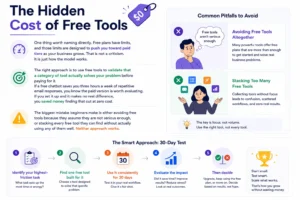
One thing worth naming directly. Free plans have limits, and those limits are designed to push you toward paid tiers as your business grows. That is not a criticism. It is just how the model works.
The right approach is to use free tools to validate that a category of tool actually solves your problem before paying for it. If a free chatbot saves you three hours a week of repetitive email responses, you know the paid version is worth evaluating. If you set it up and it makes no real difference, you saved money finding that out at zero cost.
The biggest mistake beginners make is either avoiding free tools because they assume they are not serious enough, or stacking every free tool they can find without actually using any of them well. Neither approach works.
Pick your highest-friction task. Find one free tool built for it. Use it consistently for 30 days. Then decide.
Full Free Tool Summary
| Category | Tool | Free Plan Quality | Best Situation |
|---|---|---|---|
| Writing | Claude | Strong | Long-form, research |
| Writing | ChatGPT | Moderate | General drafts |
| Writing | Copy.ai | Limited | Short-form, ads |
| Design | Canva | Very strong | All visual formats |
| Design | Adobe Firefly | Good (credits) | Custom images |
| Customer support | Tidio | Limited (50 chats) | Early-stage businesses |
| Customer support | Crisp | Solid | 2-person teams |
| Research | Perplexity | Very strong | Cited research |
| Research | Google Gemini | Strong | Trending topics |
| Social | Buffer | Adequate | 3 platforms |
| Social | Metricool | Solid | Analytics + scheduling |
| Automation | Make | Strong | Multi-step workflows |
| Finance | Wave | Excellent | International freelancers |
| Finance | Zoho Invoice | Strong | Invoicing only |

Frequently Asked Questions
Q1. Are these free AI tools actually safe to use for business data?
Most established platforms, Canva, Notion, Buffer, Wave, have privacy policies that outline how data is handled. For sensitive client or financial data, read the privacy policy before entering anything. Tools like Wave and Zoho are built specifically for business data and maintain standard security practices. For AI writing tools, avoid pasting confidential client information into prompts on free plans where data may be used for training.
Q2. Can free AI tools replace paid software completely for a small business?
For early-stage businesses with low volume, yes, many free plans cover the full need. As volume grows, paid plans become worth evaluating. A business sending 500 chat conversations per month will outgrow Tidio’s free tier quickly. A business scheduling 200 social posts monthly will outgrow Buffer’s free plan. The free tools are a real starting point, not a permanent ceiling for everyone.
Q3. Which free AI tool gives the most value for a complete beginner?
Canva for design and Claude or ChatGPT for writing are the two categories where free tools deliver the most immediate, visible impact for beginners. Both require no technical setup and show results within the first session.
Q4. Do free AI tools work for businesses outside the US?
Most of the tools in this list work internationally. Wave and Zoho Invoice specifically support multi-currency invoicing, which matters for freelancers and businesses in Pakistan, India, and other markets billing international clients. Canva, Buffer, Perplexity, and the AI writing tools have no geographic restrictions on their free plans.
Q5. How do I decide which free tool to start with?
Identify where the most time is currently lost each week. If it is writing, start with Claude or ChatGPT. If it is social posting, start with Buffer or Metricool. If it is design, start with Canva. If it is customer questions, start with Tidio. One tool, one problem, 30 days. That is the sequence that works.
Closing Thought
The gap between a well-resourced business and a small one used to be partly about access to capability. A larger business had a design team, a writer, a support person, an analyst. A small business had none of that.
Free AI tools have compressed that gap in ways that would have seemed implausible five years ago. A single person running a small operation today has access to writing assistance, design tools, research capability, and automation that would have required a team or a significant software budget a decade ago.
That access does not solve everything. Execution, judgment, and consistency still matter more than tools. But for the specific problem of doing more with limited hours and a limited budget, the free AI tools available right now are genuinely useful starting points.
If you are exploring how to build an income stream alongside or through your small business using AI, the guide to starting an AI agency and the overview of the best AI tools for beginners are both worth reading next. For those looking at digital product income, the options around selling digital products without upfront investment connect directly to several tools covered here.