Best AI Apps for Daily Planning in 2026
Most people do not have a planning problem. They have a follow-through problem.
The to-do list gets written. The calendar gets blocked. And then Tuesday happens, and by 11am the whole structure has collapsed because three unexpected things arrived and nothing was prioritized properly to begin with.
While testing productivity tools across different work styles over the past year, I kept running into the same pattern. People were not failing at planning because they lacked discipline. They were failing because their planning systems required more upkeep than the actual work. An AI app that updates itself, reschedules automatically, and actually understands context changes everything about that equation.
This guide covers the best AI apps for daily planning right now, what each one actually does well, where the free plans hold up, and who each tool fits best.
How These Apps Were Evaluated Testing covered daily use across task management, calendar scheduling, focus sessions, note-taking, and habit tracking. Free plan usability, AI feature quality, and real-world reliability across desktop and mobile were all factored in. Apps that sounded impressive in demos but underdelivered in actual daily use did not make this list.
Why AI Planning Apps Work Differently Than Regular Planners
A standard to-do app shows you what you wrote. That is it. It does not know that your 2pm call runs long, that you work better in the morning, or that the task you have been avoiding for four days probably needs to be broken into smaller pieces before it will ever get done.
AI planning apps start to learn those things. Over time, some of them reschedule tasks based on your behavior, flag when you are overloaded before it becomes a problem, and suggest what to work on next based on deadlines, energy patterns, and calendar context.
After comparing several tools across different workflows, I found that the gap between a smart AI planner and a basic task list is not subtle. It is the difference between a system that keeps up with your day and one that becomes another thing you have to maintain.
1. Reclaim.ai — Best for Automatic Calendar Scheduling
Reclaim.ai is the tool I come back to more than anything else in this category. It connects to Google Calendar and automatically schedules tasks, habits, and focus time around your existing meetings.
You add a task, set a deadline and an estimated duration, and Reclaim finds the right time for it. If a meeting moves, Reclaim reschedules the task. If you finish something early, it pulls forward what is next. The system adapts in real time rather than making you rebuild your day from scratch every time something shifts.
The habit scheduling feature is quietly one of the best implementations I have seen. You tell it you want 30 minutes of deep work every morning before 10am, and it protects that slot automatically, working around whatever else lands on your calendar.
Reclaim.ai: Pros and Cons
Pros:
- Automatically reschedules tasks when meetings conflict
- Habit scheduling that actually protects the time
- Works without manual calendar management after setup
- Free plan is genuinely useful
Cons:
- Only works with Google Calendar (no Outlook on free plan)
- Takes a few days of use before the scheduling feels intuitive
- Limited task management features beyond scheduling
Free plan limit: 3 habits, basic task scheduling, 1 calendar.
Best for: Freelancers, remote workers, solopreneurs who live in Google Calendar and want planning to happen automatically.
A content writer I know was spending 20 minutes every morning manually figuring out what to work on and blocking time for it. After setting up Reclaim, that decision stopped being a decision at all. Her tasks appeared on the calendar. She worked through them. At the end of the month she had completed more projects than any previous month without working longer hours.
2. Motion — Best for AI-Powered Task Prioritization
Motion describes itself as an AI calendar and project manager. That is accurate, though it undersells how different the experience feels once it is running.
Motion takes your full task list, your calendar, and your deadlines, and builds your day automatically. Every morning you get a schedule. If something urgent comes in, you add it and Motion rebuilds the day around it. If you fall behind on a task, it finds another slot rather than letting the deadline quietly approach unnoticed.
What surprised me most about Motion was how much mental load it removes. Most planning systems require constant decisions about sequencing, priority, and timing. Motion makes those decisions for you based on the rules you set upfront.
It is not free. The starting price is around $19 per month. But for anyone whose biggest productivity cost is the overhead of managing their own schedule, that cost is easy to justify.
Free plan: No free plan. 7-day trial available.
Best for: Small business owners, project managers, anyone juggling multiple deadlines simultaneously.
Reclaim vs Motion: Quick Comparison
| Feature | Reclaim.ai | Motion |
|---|---|---|
| Auto-scheduling | Yes | Yes |
| Free plan | Yes | No (trial only) |
| Project management | Basic | Full |
| Calendar support | Google only (free) | Google and Outlook |
| Best fit | Solopreneurs, freelancers | Teams, business owners |
3. Notion AI — Best for Planning Combined With Documentation
Notion has become the planning tool of choice for a large number of independent operators and small teams, and the addition of AI features has made it considerably more useful for daily workflow.
The core planning use is building a personal system inside Notion, a task database, a daily journal template, a project tracker, and using Notion AI to summarize, prioritize, and generate content within that system. You can ask it to pull your open tasks and sort them by urgency. You can ask it to summarize last week’s meeting notes and surface action items. You can ask it to draft your daily plan as a structured list from your existing project notes.
One thing that became obvious after using Notion AI regularly: it works best as a layer on top of information you have already captured. It is less useful as a standalone planning tool and more useful as an intelligence layer over your existing documentation and task system.
Free plan: Notion workspace is free with generous limits. Notion AI is a paid add-on at around $10 per month per member.
Best for: Writers, consultants, small teams who already use Notion or want a single workspace for planning and documentation.
4. Todoist with AI Features — Best for Simple Smart Task Management
Todoist has been one of the most reliable task management tools available for years. The addition of AI features, specifically smart scheduling suggestions and natural language task entry, has made it more useful for daily planning without overcomplicating the experience.
You type a task in plain language. “Review client proposal by Thursday afternoon.” Todoist parses the deadline, sets the priority, and drops it into the right place. The AI scheduling assistant suggests when to work on tasks based on your existing schedule and past behavior.
It is not as aggressive about automation as Reclaim or Motion. It still requires more manual decision-making. But for people who want to stay in control of their planning while getting AI assistance at specific moments, Todoist hits the right balance.
Free plan: Solid free tier covering unlimited tasks, 5 active projects, and basic AI features.
Best for: People who prefer a traditional task list with AI assistance rather than full AI automation.
Todoist: Pros and Cons
Pros:
- Natural language task entry that actually works
- Clean interface that does not require onboarding
- Reliable free plan with no major feature gaps for basic use
- Available on every platform including mobile
Cons:
- AI scheduling is suggestive, not automatic
- Free plan limits active projects to 5
- Less powerful than Motion or Reclaim for calendar integration
5. Structured — Best Visual Daily Planner with AI
Structured takes a different approach to daily planning. Instead of a list or an automated calendar, it gives you a visual timeline of your day and uses AI to help populate and organize it.
You block tasks on the visual timeline, and the app uses AI suggestions to help you sequence them logically, account for transition time between activities, and flag when you have packed too much into a window. The interface is designed for clarity, which sounds minor until you have used it for a week and notice that seeing your day as a visual block helps you make better time estimates.
From my experience, Structured works particularly well for people who are visual thinkers and find traditional task lists abstract. The timeline format makes overloading your day visible in a way a list does not.
Free plan: Available with basic features. Premium unlocks AI suggestions and advanced scheduling.
Best for: Visual thinkers, people who overbook themselves regularly, students and professionals who want clarity over their day at a glance.
6. ChatGPT as a Planning Assistant — Best Free Option for Flexible Daily Planning
ChatGPT is not a dedicated planning app. But used deliberately, it is one of the most flexible free daily planning tools available.
The workflow that actually holds up is this. At the start of each day, you paste your task list and any constraints, meetings, energy notes, deadlines, into a prompt. You ask ChatGPT to build a prioritized schedule for the day. It returns a structured plan with reasoning for the sequencing.
This takes about three to five minutes. The result is a daily plan built around your specific context, not a generic template.
What I realized after using this approach consistently for several weeks is that the value is not just the output. It is the act of articulating your day to an AI that forces you to think clearly about what actually needs to happen. The planning process itself becomes sharper.
Free plan: GPT-3.5 is free with daily limitations on conversations.
Best for: People who want AI planning assistance without paying for a dedicated app, or who want to test AI-assisted planning before committing to a paid tool.
Sample Planning Prompt That Works
“Here are my tasks for today: [list]. My meetings are at [times]. I have about 5 hours of focused work available. I work best in the morning for deep thinking tasks. Build me a prioritized schedule with time blocks and a brief reason for each sequencing decision.”
The output from a clear prompt like this is consistently more useful than anything a generic to-do app produces.
7. Sunsama — Best for Thoughtful Daily Planning Rituals
Sunsama is built around a specific philosophy: planning should be intentional, not just reactive. Each morning, the app guides you through a structured planning ritual. You pull in tasks from connected tools like Notion, Asana, or GitHub, estimate how long each will take, and set realistic intentions for the day.
The AI features help with time estimates, task prioritization, and end-of-day reviews. The guided workflow is slower and more deliberate than most planning apps, which is either its biggest strength or its biggest drawback depending on your work style.
After testing different approaches across fast-paced and slower workflow types, I found Sunsama fits best for people who want planning to feel meaningful rather than mechanical. It is not designed for someone who wants to automate everything. It is designed for someone who wants to think clearly about each day.
Free plan: No free plan. Around $20 per month with a 14-day trial.
Best for: Knowledge workers, coaches, consultants who want structured intentional daily planning rather than full automation.
8. Otter.ai — Best for Meeting Notes That Feed Into Planning
Otter.ai records, transcribes, and summarizes meetings automatically. Its connection to daily planning is direct: after every meeting, Otter extracts action items and decisions, which become tasks for the day or week.
For anyone whose planning system breaks down because commitments made in meetings never make it back to the task list, Otter closes that gap. It integrates with Zoom, Google Meet, and Microsoft Teams.
Free plan: 300 minutes of transcription per month, 3 audio imports.
Best for: Small business owners, consultants, freelancers in meetings regularly who lose track of commitments made verbally.
Otter.ai: Pros and Cons
Pros:
- Automatic transcription without manual note-taking
- AI summary and action item extraction
- Integrates with major meeting platforms
- Generous free plan for low to medium meeting volume
Cons:
- Transcription accuracy dips with accents or overlapping speakers
- Action items sometimes need manual review for accuracy
- Free plan limits can fill quickly in meeting-heavy weeks
How to Choose the Right AI Planning App
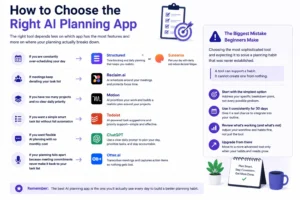
The right tool depends less on which app has the most features and more on where your planning actually breaks down.
If you are constantly over-scheduling your day, Structured or Sunsama.
If meetings keep derailing your task list, Reclaim.ai.
If you have too many projects and no clear daily priority, Motion.
If you want a simple smart task list without full automation, Todoist.
If you want flexible AI planning with no monthly cost, ChatGPT with a clear daily prompt.
If your planning falls apart because meeting commitments never make it back to your task list, Otter.ai.
The biggest mistake beginners make is choosing the most sophisticated tool and expecting it to solve a planning habit that was never established. A tool can support a habit. It cannot create one from nothing. Start with the simplest option that addresses your specific breakdown point, use it consistently for 30 days, and upgrade from there.
Full Comparison Table
| App | Free Plan | Best Feature | Best For | Price (Paid) |
|---|---|---|---|---|
| Reclaim.ai | Yes | Auto calendar scheduling | Freelancers, solopreneurs | From ~$8/month |
| Motion | Trial only | Full AI day building | Business owners, teams | From ~$19/month |
| Notion AI | Workspace free, AI paid | Documentation + planning | Writers, consultants | AI from ~$10/month |
| Todoist | Yes | Natural language tasks | Simple task management | From ~$4/month |
| Structured | Yes (basic) | Visual day timeline | Visual thinkers | From ~$4/month |
| ChatGPT | Yes | Flexible daily prompts | Budget-conscious planners | Free |
| Sunsama | Trial only | Guided planning ritual | Intentional workers | From ~$20/month |
| Otter.ai | Yes | Meeting transcription | Meeting-heavy professionals | From ~$10/month |

Frequently Asked Questions
Q1. Which AI planning app works best on mobile?
Todoist and Structured are both strong on mobile. Todoist has one of the cleanest mobile interfaces in the category and the natural language entry works well on a phone keyboard. Structured’s visual timeline is designed with mobile in mind. Reclaim and Motion are more desktop-oriented, though both have mobile apps.
Q2. Can AI planning apps connect with tools I already use?
Most of the apps covered here integrate with common tools. Reclaim connects with Google Calendar, Todoist, Asana, and Linear. Motion integrates with Google Calendar and Outlook. Otter connects with Zoom, Google Meet, and Teams. Notion connects with almost everything via its API. Check each app’s integrations page before committing, since this changes regularly.
Q3. Are AI planning apps secure enough for business use?
Established apps like Notion, Todoist, and Otter operate with standard business-grade security and published privacy policies. For sensitive meeting content, review Otter’s data retention policy before recording confidential client calls. Most platforms offer data deletion on request.
Q4. How long does it take for an AI planning app to start being useful?
Reclaim and Motion need about a week of real use before the scheduling feels natural. Todoist and ChatGPT are useful from the first session. Structured shows value within the first day. Sunsama takes longer because the value is in the ritual, which builds over weeks. Set realistic expectations: most AI planning tools require two to four weeks before they fit your workflow properly.
Q5. Do any of these apps work for team planning, not just individual use?
Motion has team features built in. Notion is widely used for small team planning. Reclaim has team plan options. Otter works well for shared meeting notes across a team. For a two to five person small business, Notion combined with either Reclaim or Motion covers most team planning needs without needing enterprise software.
One Final Thought
Planning is not the goal. The goal is the work that good planning makes possible.
The best AI planning app is not necessarily the one with the most features. It is the one that makes it easier for you to start the right thing at the right time and finish more of what you started. That answer is different for everyone, which is why this category has room for eight genuinely distinct tools.
Pick the one that addresses your actual breakdown point. Build the habit around it. The system will follow.
For anyone building a broader digital workflow around these tools, the guide to the best AI tools for beginners covers the foundational layer, and if you are thinking about how AI productivity connects to freelance income, the freelancing websites overview is worth reading alongside this one.
App features, pricing, and free plan limits are subject to change. Verify current details on each platform’s official website before making decisions.